Stop invalid addresses at checkout

Power Address Validator checks every shipping address in Shopify checkout and tells the customer exactly what to fix, before the order is placed. After checkout, Smarty and DHL can check the order again.

  • Free plan
  • No per-order fees
  • Works on every Shopify plan
  • Smarty and DHL integrations

Delivery

Country/RegionUnited States
First nameAlex
Last nameSmith
AddressPO Box 123

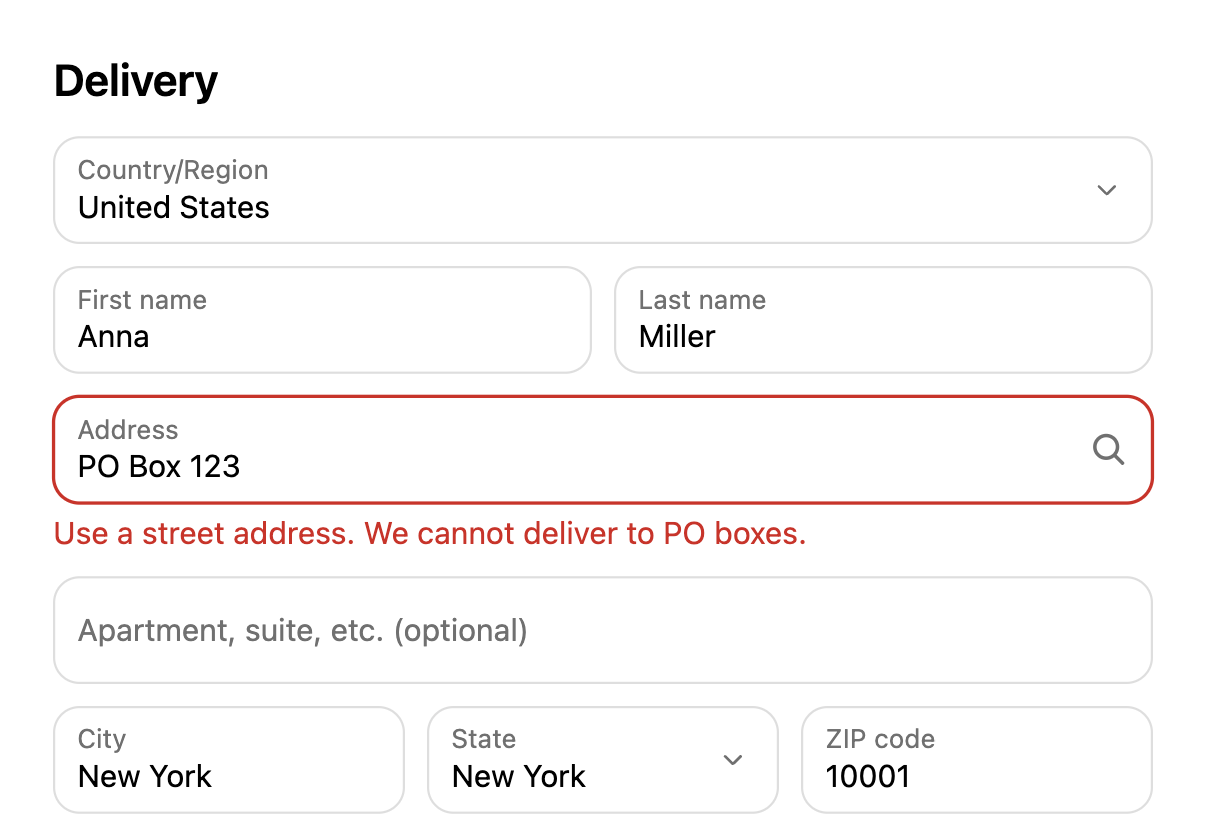
Use a street address. We cannot deliver to PO boxes.

Apartment, suite, etc. (optional)
Postal code10001
CityNew York

Caught by PO boxesStarter plan

Try an example

See it in under a minute

A PO box refused at a real checkout, the rule behind it, the street address that goes through, then Smarty and Analytics after checkout.

Set it up once. Every address gets checked.

  1. Choose your rules

    Turn on the checks you need and pick the countries each one applies to. The app adds them to your Shopify checkout.

  2. Customers fix mistakes at checkout

    When an address breaks a rule, the customer sees a clear message under the field, in their checkout language, and can't continue until it's fixed.

  3. Check orders after checkout

    On the Advanced plan, Smarty confirms the address exists and DHL confirms Packstation Postnummers. Each checked order gets a tag, and Analytics lists them all.

11 checks at checkout, plus Smarty and DHL after it

Every rule runs only in the countries you pick, with a message you can rewrite.
Checkout blocks a PO box address with a clear message

Block PO boxes Starter plan

  • Looks at Address, Apartment, suite, etc. and Company.
  • Catches PO Box, P.O. Box, Post Office Box, Postfach, Boîte postale, Apartado postal, Apartado de correos and Casella postale.
  • Runs only in the countries you pick.
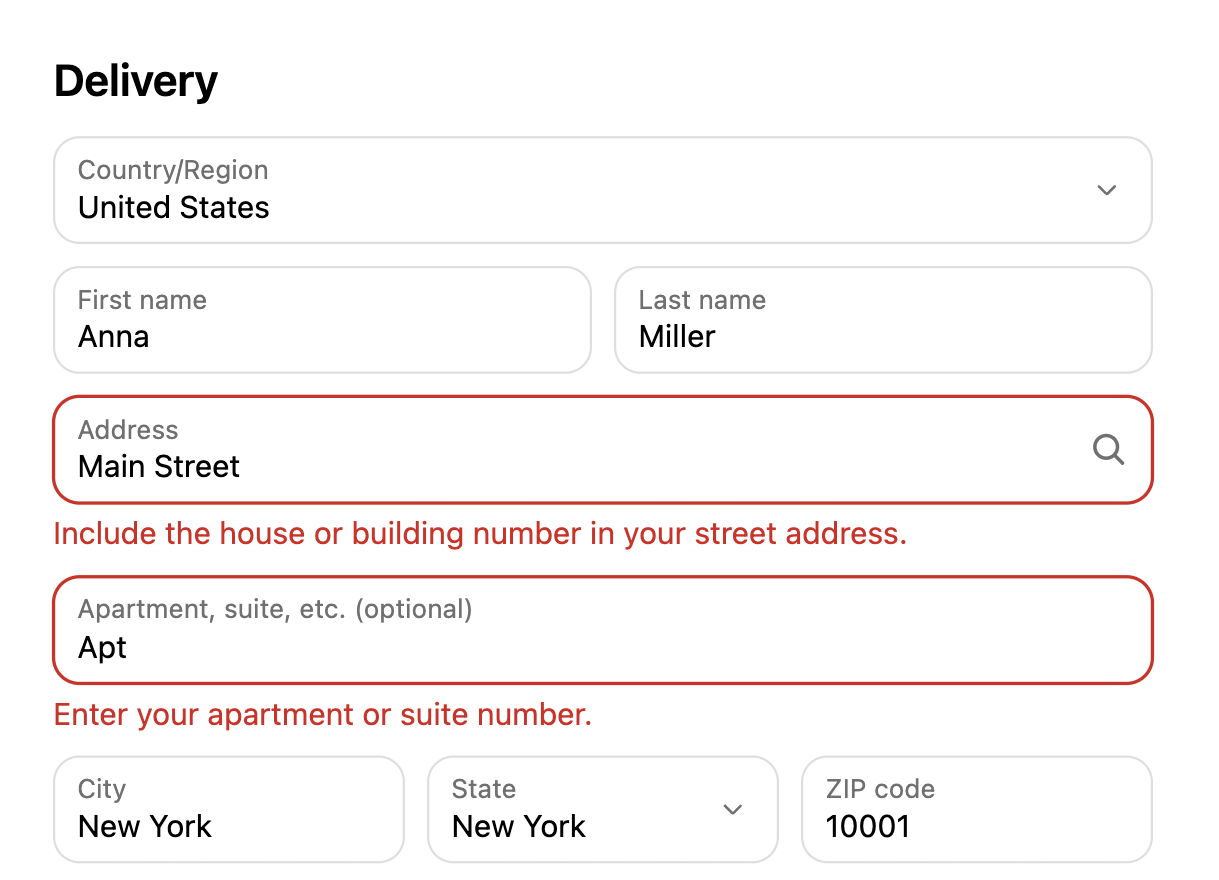
Checkout asks for a missing house and apartment number

House and apartment numbers Starter plan

  • Address must contain a house number in the countries you choose.
  • When the address mentions Apt, Apartment, Suite, Unit, Wohnung or Appartement, a number must follow it. Or make Apartment, suite, etc. required.
  • DHL Packstation, Paketshop and Postfiliale addresses are skipped.
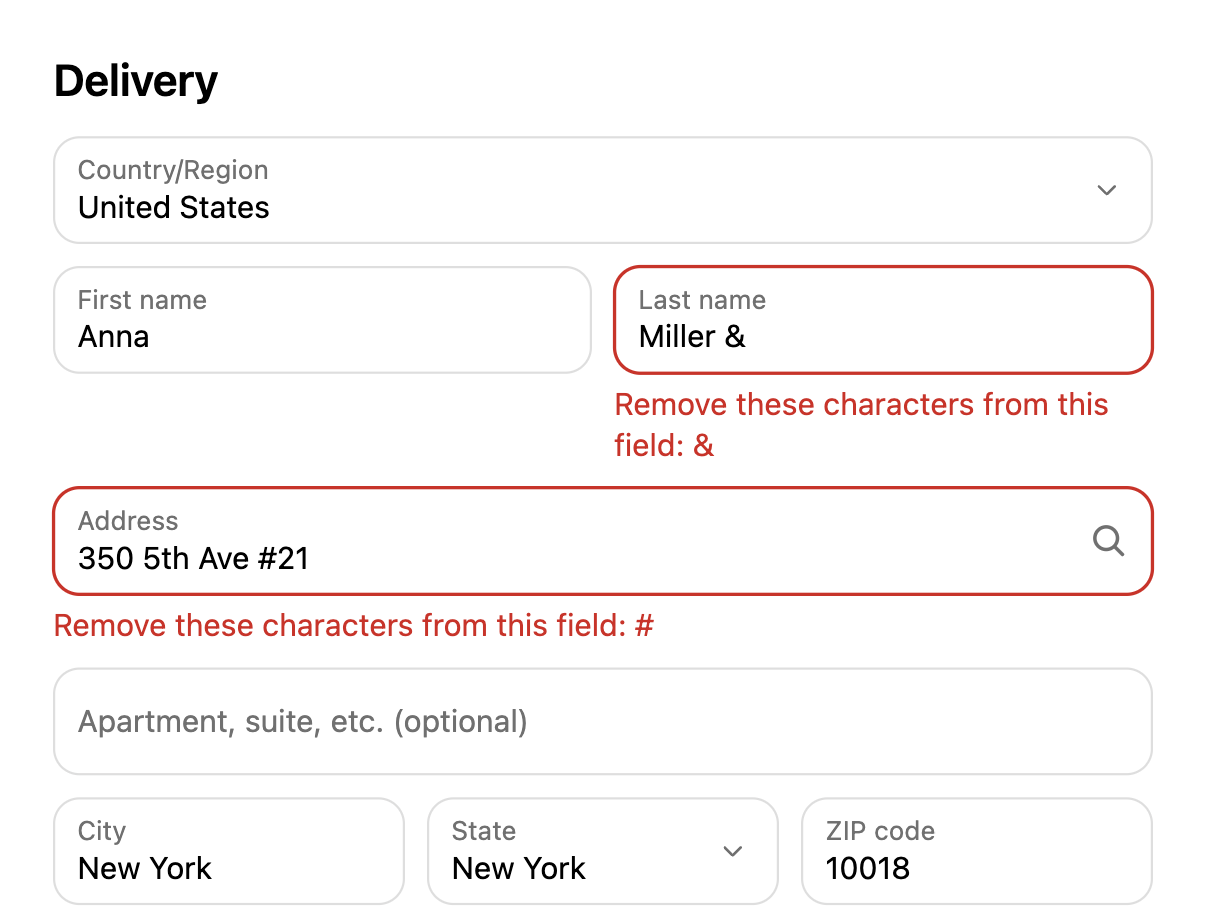
Checkout flags & and # in the name and address fields

Special characters and emojis Starter plan

  • Make lists of characters to block, such as & or #. Each list chooses its fields and countries.
  • Blocks emoji such as 😀 or 🏠 in every field, including names and company.
  • The message tells the customer exactly which characters to remove.
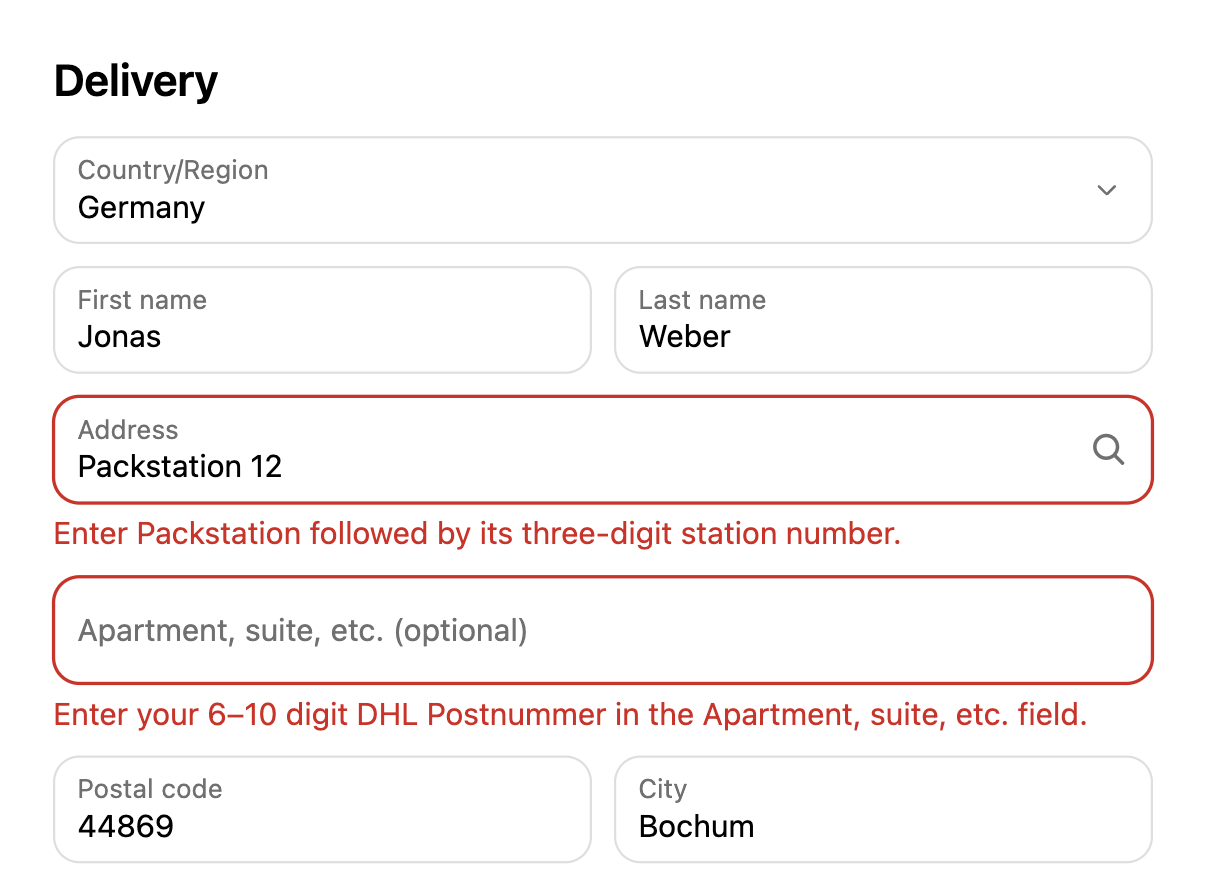
German checkout asks for a Packstation number and Postnummer

DHL Packstation and Paketshop Growth plan

  • Germany only. The address must be Packstation followed by its 3-digit station number.
  • The 6–10 digit Postnummer goes in Apartment, suite, etc., in Company, or at the end of the last name.
  • Block Paketshop and Postfiliale addresses if you can't ship there.
  • Advanced plan: after the order is placed, DHL checks that the Postnummer matches the customer's name. Orders that fail get the tag packstation-invalid, so you can hold them with Shopify Flow.
How to get your DHL credentials

The Postnummer check needs the Advanced plan and four values from DHL: an API key, an API secret, and your business customer portal username and password.
  1. Make sure you have a business customer contract with DHL Paket GmbH and a login for the DHL business customer portal (Geschäftskundenportal). That login is the username and password you enter in the app.
  2. Sign up or log in at developer.dhl.com.
  3. Open the Parcel DE Postnumber API page and click Get Access. This creates an app with the API already selected.
  4. Wait for DHL to approve it. Approval is manual; for urgent requests, use the contact form on the developer portal.
  5. Once approved, open your app on developer.dhl.com and copy its API key and API secret.
  6. In Power Address Validator, open Integrations, enter the API key, API secret, portal username and password under DHL Postnumber check, and click Connect. The app signs in to DHL once to check them, then stores them encrypted.
  7. Turn on the DHL Packstation rule. Orders are only checked while it is on.
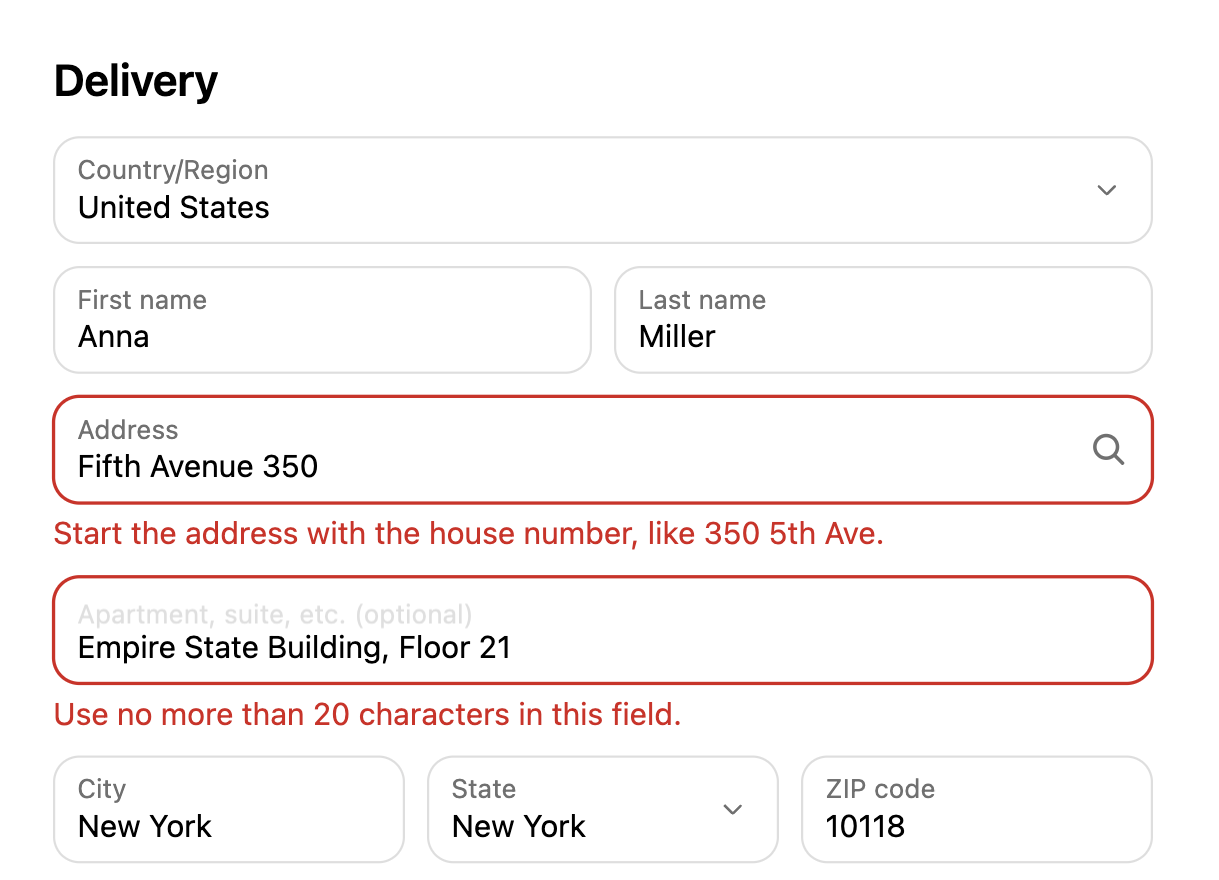
Checkout shows a custom regex error and a 20 character limit

Character limits and custom regex Growth plan

  • Set a maximum length for any field, with exceptions for some countries.
  • Require or block your own regex patterns (RE2 syntax) on a field, with your own message.
  • Each pattern applies only in the countries it selects.

3 issues found These issues will block checkout when the app is active.

AddressUse a street address. We cannot deliver to PO boxes.PO boxes · All countries
Last nameRemove these characters from this field: &Special characters · All countries
Postal codeEnter a valid postal code for US.Postal code format · All countries

Test any address Free plan

  • Type an address or pick a sample, such as a PO box or a Packstation without a Postnummer.
  • See every issue, the message the customer would get and the rule that caught it.
  • Try your rules before customers ever see them.
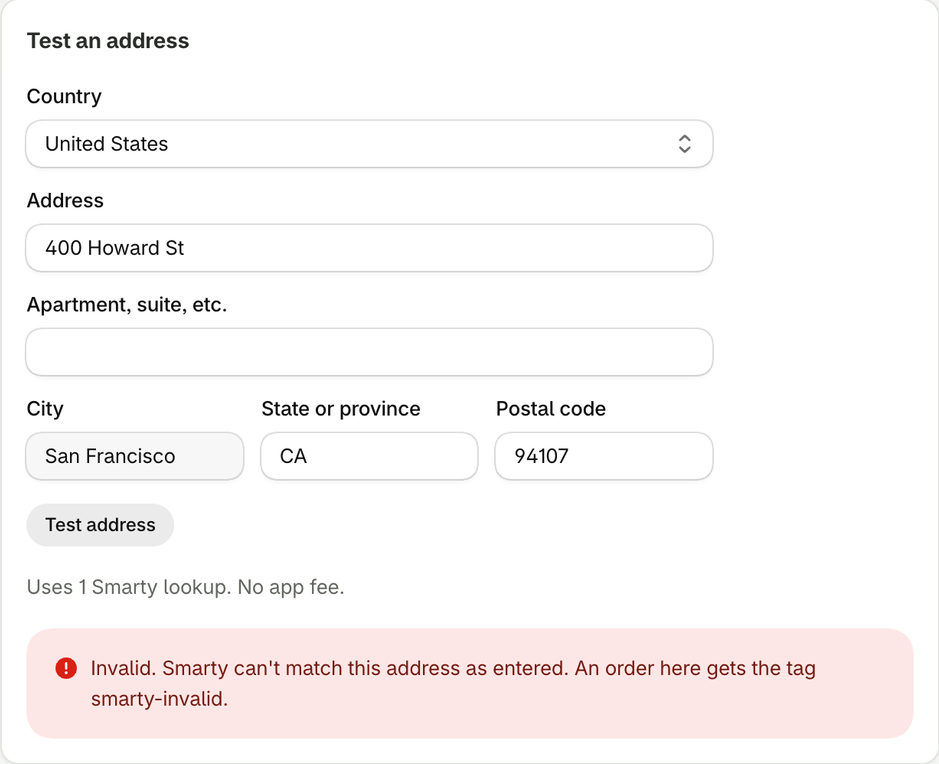
Smarty test marks an address invalid and names the tag an order would get

Smarty address check Advanced plan

  • After the order is placed, Smarty checks that the shipping address exists, in the countries you choose.
  • Each checked order gets a tag: smarty-valid, smarty-invalid or smarty-unchecked. Hold invalid ones with Shopify Flow before fulfillment.
  • Uses your own Smarty account: each check is one Smarty lookup on your Smarty plan.
  • Test any address on the Integrations page first and see the tag an order would get.
How to get your Smarty key

The Smarty check needs the Advanced plan and a Smarty secret key: its Auth ID and Auth Token.
  1. Sign in to Smarty, or create an account, and open API keys.
  2. Copy the Auth ID and Auth Token of a secret key.
  3. In Power Address Validator, open Integrations > Smarty address check, paste both, choose the countries to check and click Connect. Smarty checks the key before it is saved.
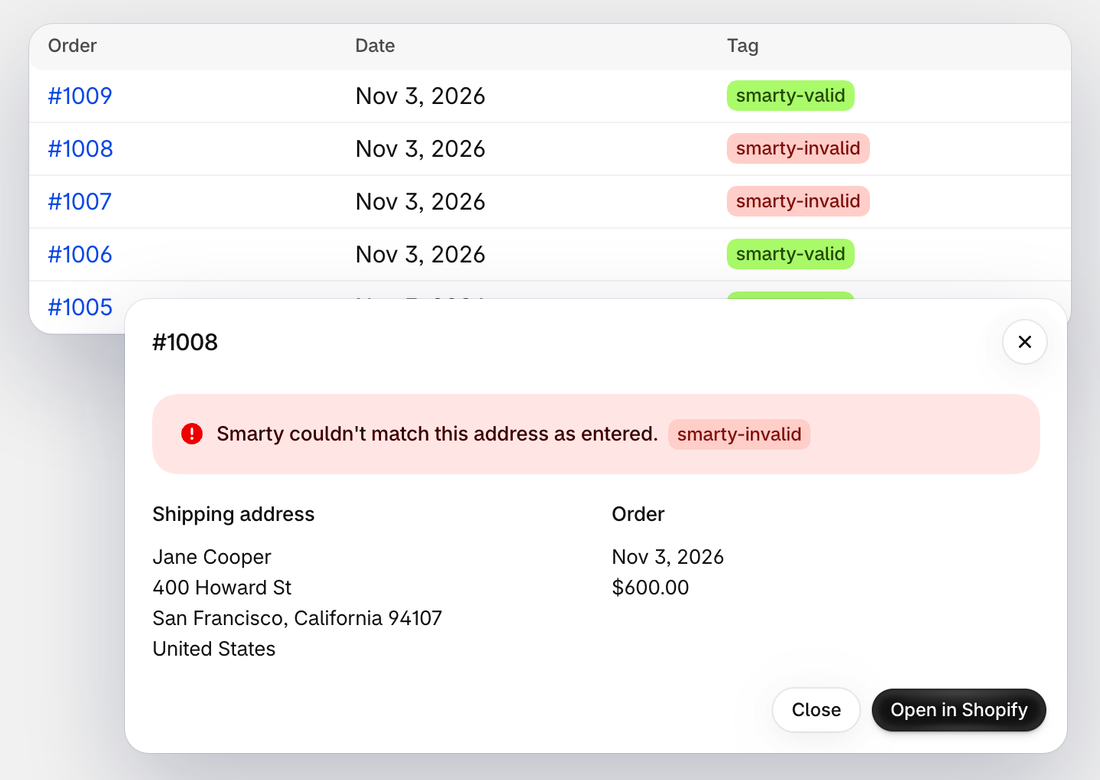
Analytics lists checked orders with their tags, with one invalid order open

Analytics Advanced plan

  • Counts orders checked after checkout, and how many were invalid or couldn't be checked, for the last 7, 30 or 60 days.
  • Lists every checked order. Filter by Smarty or DHL and by result.
  • Open an order to see its shipping address and the answer, then jump to it in Shopify.
  • Read from your Shopify order tags; the app stores no order data.
  • Postal code formatsFree

    Checks postal codes against the official format for 174 countries.

  • Blocked postal codesStarter

    Refuse postal codes you don't ship to. End a code with * to block every code that starts with it.

  • 31 languagesFree

    Messages follow the customer's checkout language. Edit any message, in any language.

Pricing

One flat monthly price, billed through Shopify, with no per-order fees however many orders you check. Paid plans start with a 14-day free trial, and development stores can try every plan for free.

Free

For getting started

$0

Free forever

  • Postal code format checks
  • Test address
  • Messages follow the customer's checkout language.

Starter

For any Shopify store

$4.99 / month

Billed monthly

  • Everything in Free
  • PO box blocking
  • Missing house numbers
  • Special characters and emojis
  • Blocked postal codes
  • Apartment and suite numbers

Growth

For your own address rules

$9.99 / month

Billed monthly

  • Everything in Starter
  • Maximum characters per field
  • Custom regex patterns
  • DHL Packstation format at checkout
  • Allow or block DHL Paketshop
Every check

Advanced

For checking orders after checkout

$19.99 / month

Billed monthly

  • Everything in Growth
  • Smarty address check after checkout
  • DHL Postnummer check after checkout
  • Analytics for every checked order
  • Connects your own Smarty or DHL account
  • No per-order app fee

Questions, answered

Something else? Write to poweraddressvalidator@gmail.com.

Which Shopify plans does it work with?
All of them. The checks run as a Shopify Function in your checkout, which every plan supports for apps from the Shopify App Store.
Do you charge per order?
No. Every plan is one flat monthly price, however many orders your store gets or the app checks. The Smarty and DHL checks after checkout use your own Smarty or DHL account.
What does the customer see?
A message under the field that needs fixing, in their checkout language. 31 languages are built in, and you can rewrite any message on the Languages page.
Can I try it before it affects my checkout?
Yes. Use the Test address page to check any address against your rules, and switch the whole app off with Enable app at any time. Development stores can try every plan for free.
What happens to orders Smarty or DHL can't confirm?
The app adds the tag smarty-invalid when Smarty can't match the address as entered, or packstation-invalid when DHL says the Postnummer and name don't match. Orders that can't be checked get smarty-unchecked or packstation-unchecked. Analytics lists them all, and Shopify Flow can hold tagged orders before fulfillment.
How do I connect Smarty?

The Smarty check needs the Advanced plan and a Smarty secret key: its Auth ID and Auth Token.

  1. Sign in to Smarty, or create an account, and open API keys.
  2. Copy the Auth ID and Auth Token of a secret key.
  3. In Power Address Validator, open Integrations > Smarty address check, paste both, choose the countries to check and click Connect. Smarty checks the key before it is saved.
How do I get my DHL credentials for the Postnummer check?

The Postnummer check needs the Advanced plan and four values from DHL: an API key, an API secret, and your business customer portal username and password.

  1. Make sure you have a business customer contract with DHL Paket GmbH and a login for the DHL business customer portal (Geschäftskundenportal). That login is the username and password you enter in the app.
  2. Sign up or log in at developer.dhl.com.
  3. Open the Parcel DE Postnumber API page and click Get Access. This creates an app with the API already selected.
  4. Wait for DHL to approve it. Approval is manual; for urgent requests, use the contact form on the developer portal.
  5. Once approved, open your app on developer.dhl.com and copy its API key and API secret.
  6. In Power Address Validator, open Integrations, enter the API key, API secret, portal username and password under DHL Postnumber check, and click Connect. The app signs in to DHL once to check them, then stores them encrypted.
  7. Turn on the DHL Packstation rule. Orders are only checked while it is on.
Does the app store my customers' data?
No. Checkout addresses are checked inside Shopify, and orders are not stored. After checkout, Smarty gets only the shipping address and DHL only the name and Postnummer. See the privacy policy.
How do I change or cancel my plan?
Open Plans in the app. Billing goes through Shopify, and uninstalling the app cancels the subscription.

Stop the next bad address before it ships

Start on the Free plan. Add rules as you need them.

Install on Shopify